

Dubai’s Nol card is more than just a way to travel—it can also help you save money. With NOL Plus, RTA’s official loyalty program, you earn reward points every time you use your Nol card for transport, parking, or payments at selected partner stores.
In this guide, we’ll explain what NOL Plus is, why you should register, and how to sign up step by step, so you can start earning and redeeming points on your everyday Nol card usage.
What Is NOL Plus and Why Should You Register?
NOL Plus is the official loyalty program launched by RTA Dubai. It rewards users every time they use their Nol card for public transport, parking, or payments at selected partner stores.
How NOL Plus Works (Simply Explained)
- Use your Nol card as usual
- Earn points on eligible transactions
- Redeem points for Nol card top-ups or partner discounts
This guide explains how to register for NOL Plus, link your Nol card, earn points, and redeem rewards step by step.
Before You Start: What You Need
Before registering for NOL Plus, make sure you have:
- An RTA online account
- A registered Nol card linked to that account
Step 1: Create an RTA Online Account
- Visit the official RTA Dubai website
- Click Login / Register
- Select Register as an Individual
- Enter your name, email, mobile number, and password
- Verify your account using the OTP sent via email or SMS
Your RTA account is the central hub for all Nol and RTA services.
Step 2: Register Your Nol Card Online
To use NOL Plus, your Nol card must be registered under your name.
How to Register a Nol Card
- Log in to your RTA account
- Go to Nol Services / Nol Home
- Select Manage Nol Card or Register Card
- Enter the 10-digit Nol Tag ID (printed on the back of the card)
- Add your name, Emirates ID (if available), and contact details
- Save the information
Registering your Nol card protects your balance if the card is lost or damaged.
Tip: Always check your Nol card balance before traveling to avoid delays.
Want To Learn More About Dubai Metro Map 2026: Full Route, Stations & Line Overview
Step-by-Step Guide: How to Register for NOL Plus
Step 1: Access NOL Plus
You can start registration from:
- The RTA website, or
- The official NOL Plus website
Log in using your RTA credentials or UAE Pass.
Step 2: Open the NOL Plus Registration Page
- Click Register or Sign Up under the NOL Plus section
- A short form will appear requesting:
- Name
- Mobile number
- Nationality
(Some fields may auto-fill from your RTA profile.)
Step 3: Link Your Nol Card
- If your card is already registered with RTA, it will appear automatically
- Otherwise, enter the 10-digit Nol Tag ID
Important Notes:
- You can link up to 4 Nol cards to one NOL Plus account
- At least one card must be active
Step 4: Verify Contact Details
You’ll receive an OTP via SMS or email.
Enter the OTP to confirm and secure your account.
Step 5: Accept Terms and Start Earning
Once confirmed, your NOL Plus account becomes active.
You’ll now earn points on eligible transactions automatically.
Registering NOL Plus Using the RTA Dubai or Nol Pay App
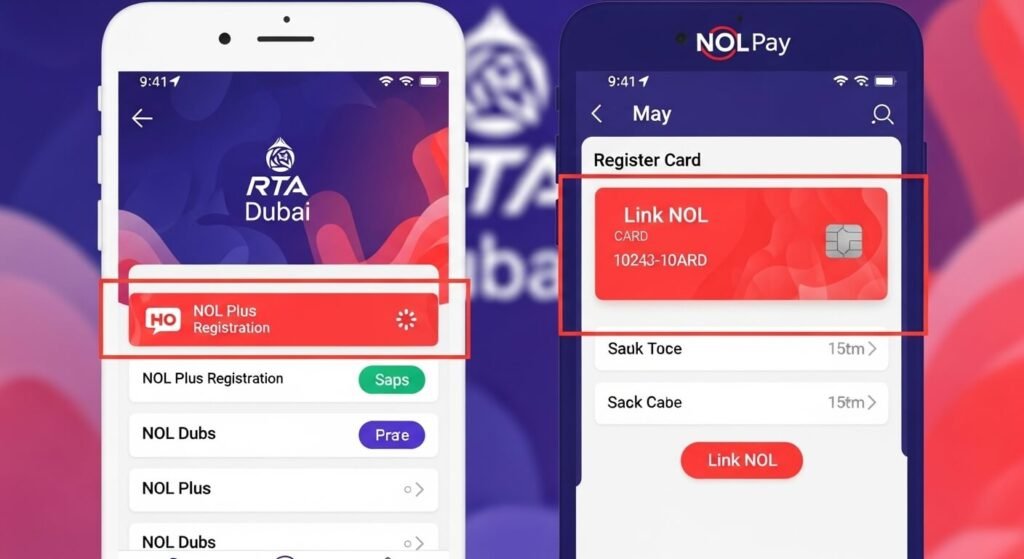
- Install RTA Dubai or Nol Pay from your app store
- Log in using RTA account or UAE Pass
- Add your Nol card if it’s not already visible
- Look for NOL Plus / Loyalty
- Tap Register
- Verify using OTP if prompted
NOL Plus Status
- Visit the NOL Plus website or RTA dashboard
- If you see:
- Linked cards
- Points balance (even zero)
Then NOL Plus is active
How to Earn Points on NOL Plus
You earn points when you use your Nol card for:
- Public Transport (Metro, Bus, Tram, Taxi)
- Parking payments
- Partner supermarkets, restaurants, and pharmacies
- Online Nol card top-ups (bonus points)
Visit Official RTA Websites
How to Check NOL Plus Points Balance
- Visit the NOL Plus website
- Log in with your RTA details
- Go to My Points
- View your total balance
Important Rules:
- Points appear after 9 days
- Points are valid for 12 months
How to Redeem NOL Plus Points
- Log in to your NOL Plus account
- Select Redeem Rewards
- Choose a reward
- Minimum redemption: 500 points (AED 5)
- Redeemed value is added to your Nol card automatically
NOL Plus Terms & Key Rules
- Points post after 9 days
- Points remain even if the card expires
- Up to 4 cards can be linked
- Personal cards earn 2 points per AED
- Standard cards earn 1 point per AED
- Points expire after 12 months
- Unlinking an anonymous card removes its points
- Only link cards that belong to you
NOL Plus Benefits
- Save money on daily transport
- Earn rewards on everyday spending
- Redeem points for shopping, dining, and travel
- Manage everything online or via mobile app
- Access exclusive offers and promotions

Common Issues & Solutions
Card Not Linking
- Double-check the 10-digit Tag ID
- Ensure the card is active
- Try using a desktop browser
Points Not Showing
- Allow time for posting
- Use the registered card only
- Ensure the transaction is eligible
Multiple Nol Cards
- Add each card’s Tag ID
- All points accumulate under one RTA account
Quick Checklist
- Create RTA account
- Register Nol card
- Sign up for NOL Plus
- Verify OTP
- Confirm points dashboard
Conclusion
Registering for NOL Plus is simple and worthwhile. Once your RTA account and Nol card are linked, enrolling in NOL Plus lets you earn rewards on every ride and purchase. Your daily commute stays the same—only now, every tap earns value.
FAQs About NOL Plus
NOL Plus is RTA Dubai’s official loyalty program. It allows Nol card users to earn reward points on public transport, parking, and partner store payments, which can be redeemed for discounts or Nol card top-ups.
Yes, you must have an active RTA online account to sign up for NOL Plus and manage your Nol card and reward points.
Why is my Nol card not linking to NOL Plus?
NOL Plus points are usually credited within 9 days after an eligible transaction is completed.
Yes, you can link up to four Nol cards to a single NOL Plus account, and all earned points will be combined in one place.